System
Operator controls for compute jobs, API credentials, licensing, compliance audit chain, organisations, engine configuration, LDD quality layers, and tenant settings.
Agentic Compute
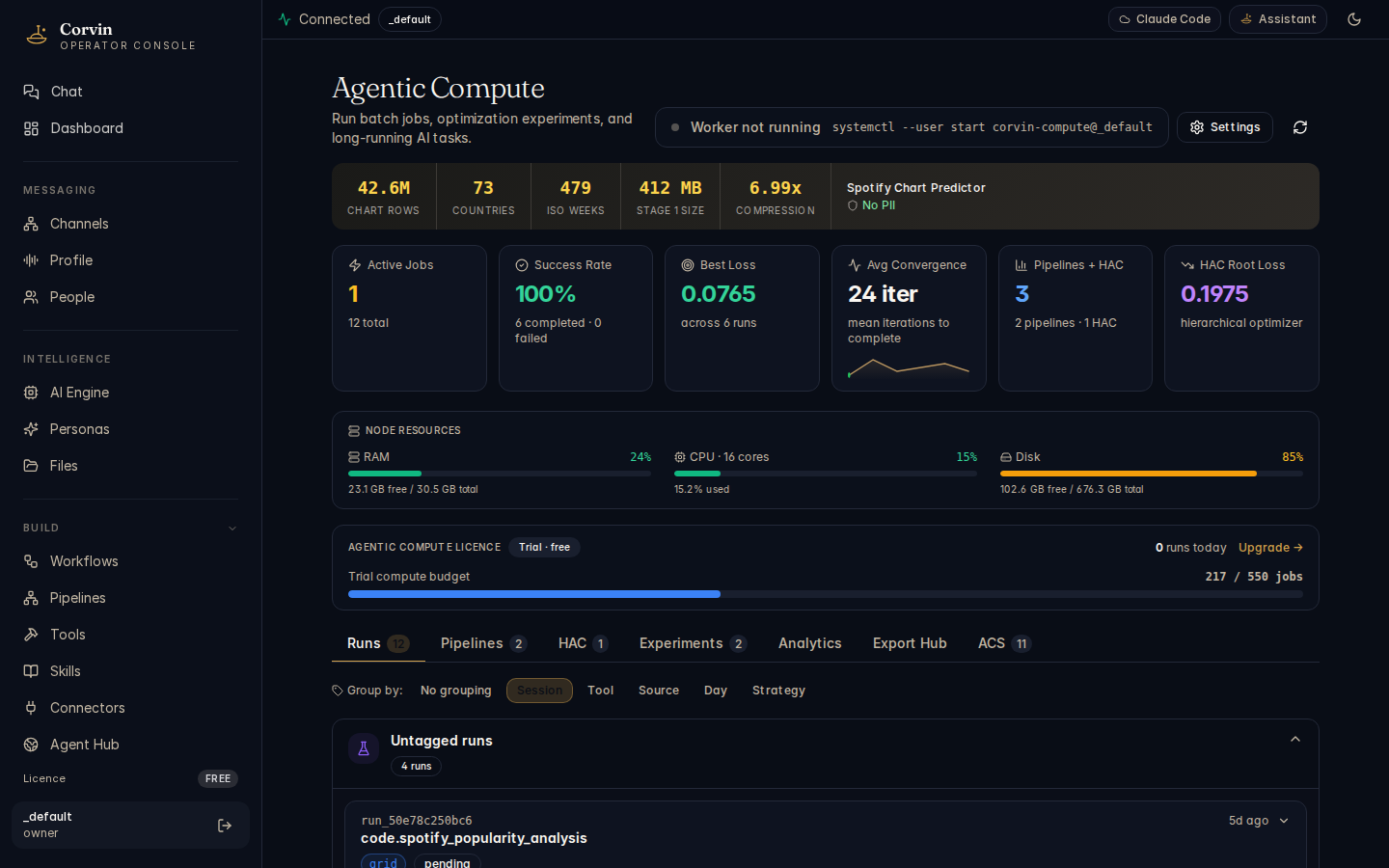
The Agentic Compute dashboard runs analytical jobs entirely outside the LLM loop. Complex or long-running calculations — parameter sweeps, data pipelines, statistical analyses — are dispatched to isolated worker processes, keeping the AI conversation responsive and the data path clean.
Dashboard tabs
The Agentic Compute page is organised into five tabs, each covering a distinct phase of the compute lifecycle:
Runs
Submit and monitor individual compute jobs. Each run shows its strategy, parameter set, status (queued, running, complete, aborted), and the result artifact once finished.
Pipelines
Chain multiple compute runs into a directed pipeline. The output of one stage becomes the input to the next, enabling multi-step analytical workflows that execute without manual intervention.
HAC
Human-Approval Checkpoints pause a pipeline at a defined step and wait for a human operator to review and approve before continuing. HAC gates are required for any stage that writes to an external system.
Analytics
Aggregate metrics across all runs: throughput, resource utilisation, error rates, and per-strategy performance trends. Export the time-series data as CSV for external analysis.
ACS
Adaptive Compute Scaling automatically adjusts the worker pool size based on queue depth and latency targets. Configure scale-up thresholds, cool-down periods, and maximum worker counts.
Search strategies
When submitting a job, choose a strategy to control how the parameter space is explored:
- Grid — exhaustively evaluates every combination of parameter values. Suitable for small, well-defined search spaces where completeness matters more than speed.
- Random — samples parameter combinations uniformly at random. More efficient than grid search for large parameter spaces when an approximate optimum is sufficient.
- Bayesian — uses a surrogate model to predict promising regions of the parameter space, directing new samples toward areas likely to improve the objective. Preferred for expensive-to-evaluate jobs.
MCP tools
The Agentic Compute layer exposes four MCP tools for programmatic control from within AI conversations or Forge tools:
compute_run— submit a new job with a strategy, parameter grid, and optional list of data source namescompute_status— poll the current status of a running or queued jobcompute_result— retrieve the output of a completed job (schema-validated, PII-redacted sample)compute_abort— cancel a queued or running job immediately
Enabling compute
The compute subsystem is on by default for all tenants. To disable it for a specific tenant, set spec.compute.enabled: false in tenant.corvin.yaml. To re-enable, set it back to true — no restart is required.
Agentic Compute runs are isolated from the LLM loop — no prompt text enters the compute worker. Credentials are injected from the vault at spawn time and are never visible to the AI. This satisfies GDPR Art. 5 data minimisation by design.
API Keys (BYOK)
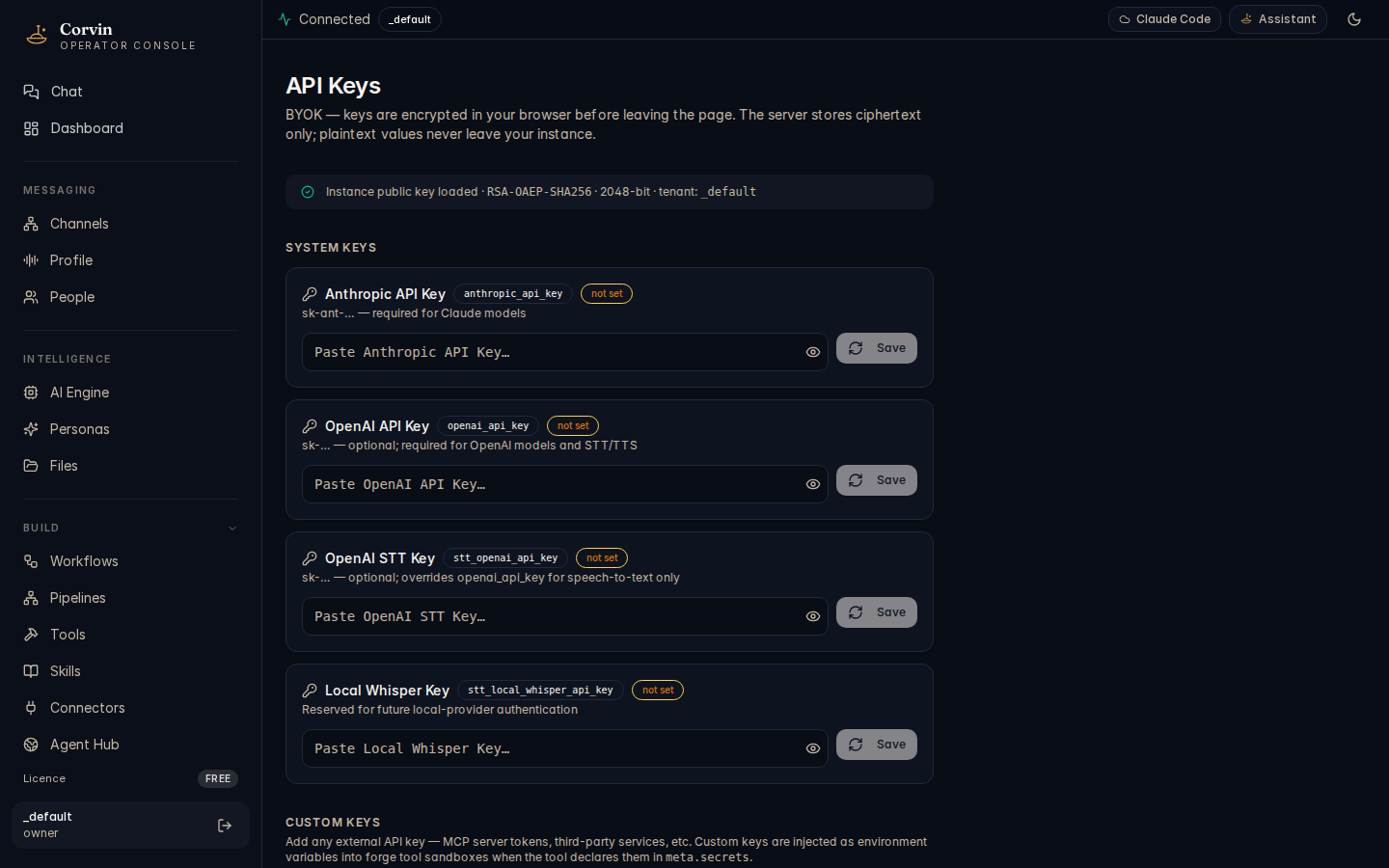
The API Keys page implements Bring Your Own Key management — store API credentials for Claude (Anthropic), OpenAI, STT providers, and any custom service, all encrypted before they leave your browser.
Client-side encryption
All keys are encrypted with RSA-OAEP in the browser before leaving the client. The encryption key pair is generated locally in your browser session; the private key stays in your browser's localStorage and is never transmitted. The server receives and stores only the encrypted blob — it never has access to the plaintext key value.
Supported providers
- Anthropic (Claude) —
ANTHROPIC_API_KEY, used by the Claude Code engine and helper model subprocesses - OpenAI —
OPENAI_API_KEY, used by OpenAI-based STT (Whisper), image generation (ImageGen MCP), and OpenCode engine - STT providers — separate keys for OpenAI Whisper and any custom speech-to-text endpoint
- Custom services — any named credential that Forge tools or compute workers declare in their
meta.secretsblock
Key lifecycle
Keys can be labelled for clarity and rotated at any time without restarting the system. Rotation replaces the encrypted blob in the vault; all subsequent spawns receive the new key. Old values are overwritten, not archived — there is no key version history in the vault.
API keys in the vault never appear in audit logs, system prompts, or LLM context. Forge tools and compute workers declare the name of the secret they need; the vault injects the plaintext value into the subprocess environment at spawn time via bwrap.
License
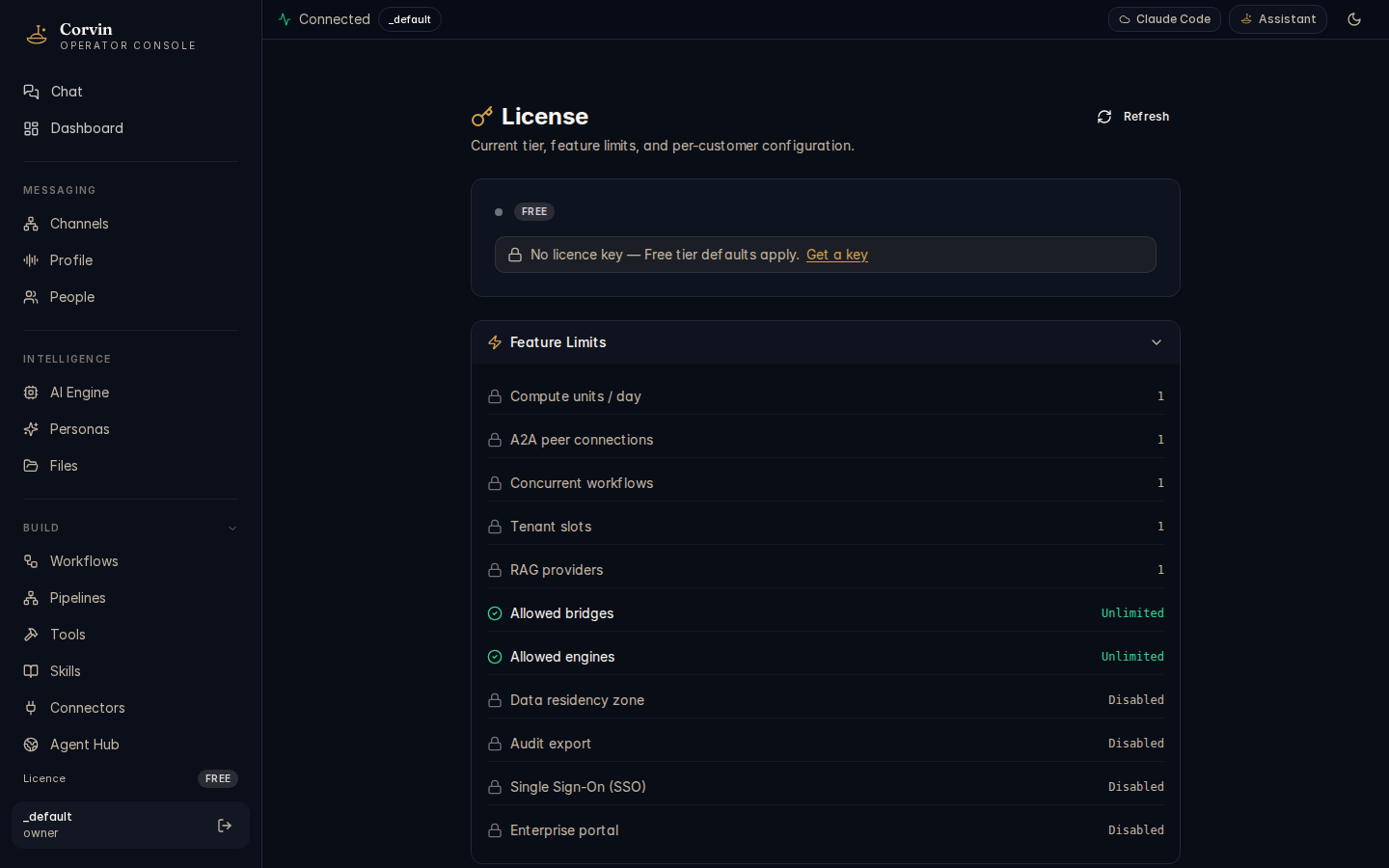
The License page shows the current license tier, the feature limits it enforces, and the enterprise features that become available at higher tiers.
License tiers
The Free tier (shown in the screenshot) includes the full Apache-2.0 core with the following limits:
a2a_peers_max: 1— one A2A remote peer for agent-to-agent communicationcompute_units_per_day: 1— one compute job per dayrag_providers_max: 1— one RAG knowledge providerworkflows_concurrent: 1— one workflow running at a time
Higher tiers (Business, Enterprise) raise or remove these limits and unlock additional features such as advanced multi-tenant isolation, enterprise SSO, and priority support. Upload a license key file issued by CorvinOS to activate a higher tier.
Local-only verification
License verification uses an RS256 JWT checked against a bundled public key. The check happens entirely on-host — there is no phone-home, no periodic re-validation against a license server, and no telemetry associated with license checks. A host without network access verifies licenses identically to a connected one.
Apache-core features
The following features are part of the Apache-2.0 core and are always free, regardless of license tier. They cannot be gated, disabled, or restricted by any license mechanism:
- Hash-chained tamper-evident audit log
- Per-user consent gate (deny-by-default, TTL-capped)
- Path-gate hook (fail-closed on FS writes)
- Engine-agnostic dispatch (all five WorkerEngines)
- Secret vault → bwrap env injection
- Bot-disclosure card (EU AI Act Art. 50)
Audit & Compliance
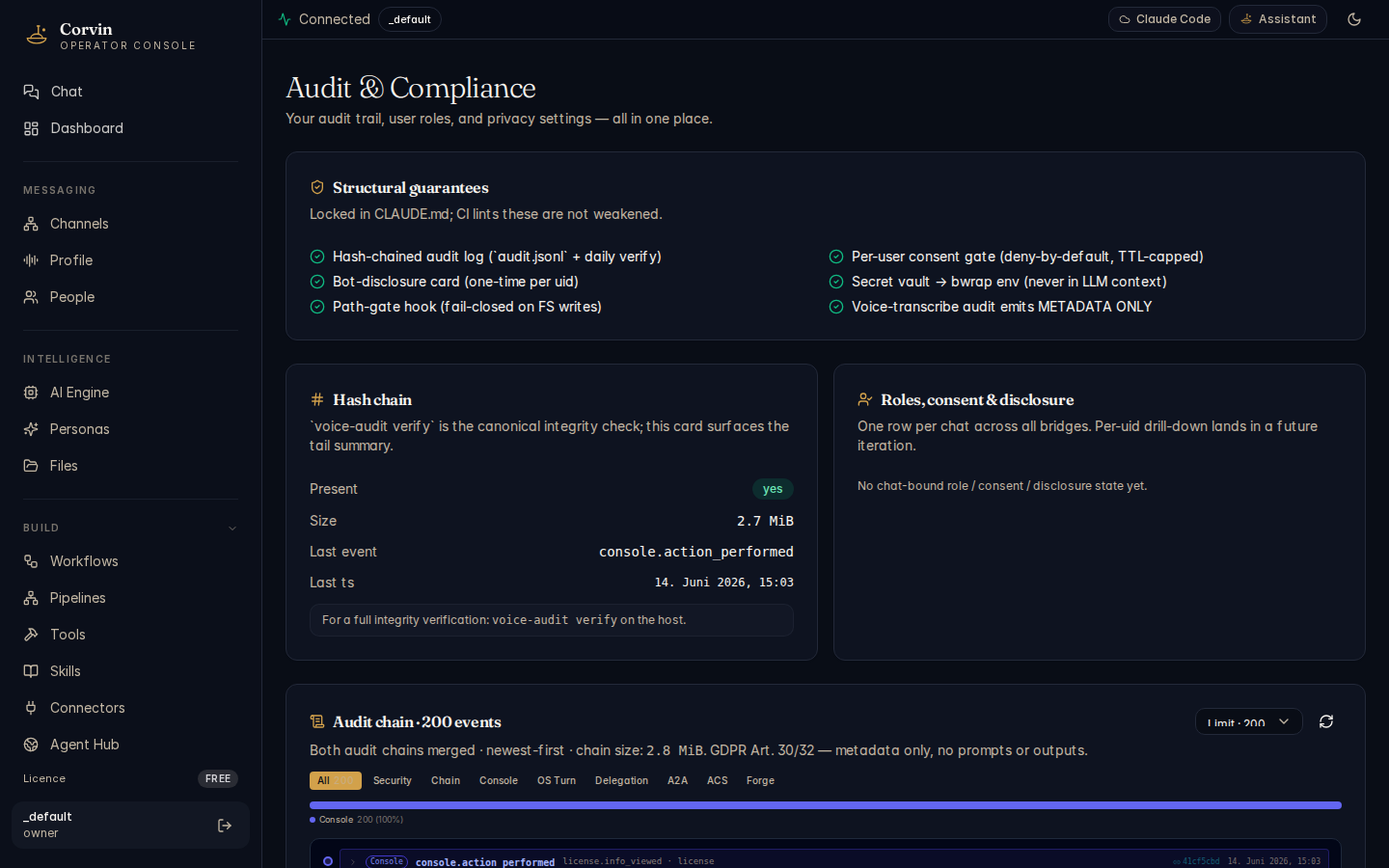
The Audit & Compliance page is the most important system page for operators. It shows the status of every structural compliance guarantee in real time and provides a live view of the audit event chain.
Structural guarantees
The top section displays six always-on protections. All six must show a green checkmark; a red indicator signals a configuration error that requires immediate attention:
Hash-chained audit log
audit.jsonl with a daily integrity verify. Each event records the SHA-256 hash of the previous event — any modification breaks the chain.
Bot-disclosure card
One-time AI-nature disclosure per user ID, delivered on first interaction. Satisfies EU AI Act Art. 50 — cannot be suppressed or bypassed.
Path-gate hook
Fail-closed pre-tool hook that blocks writes to audit files, policy files, forge workspaces, and the license tree. Any attempt emits a path_gate.denied audit event.
Per-user consent gate
Deny-by-default. Users must grant consent (/consent on) before the AI processes their messages. Consent is TTL-capped and re-validated on every message. Satisfies GDPR Art. 6 and 7.
Secret vault → bwrap env
API keys and credentials are never placed in the LLM context or system prompt. The vault injects them as environment variables into an isolated bwrap subprocess at spawn time only.
Voice-transcribe metadata only
The voice.transcribed audit event records only metadata (duration, provider, model) — never the transcript text. Satisfies GDPR Art. 5 data minimisation.
Hash chain status
Below the guarantees panel, the Hash chain section shows the live state of the audit chain for this tenant:
- Present — whether
audit.jsonlexists and is readable - Size — current file size (e.g. 2.2 MiB)
- Last event — the event type of the most recent entry (e.g.
console.action_performed) - Last timestamp — wall-clock time of the most recent event
For a full cryptographic integrity verification across all segments, run voice-audit verify on the host. The console view shows the live chain summary but does not perform the full hash-walk.
Audit chain event stream
The lower section shows the merged dual-chain event stream (OS-layer chain + console chain), newest-first, with a total size indicator (e.g. Audit chain · 200 events · 2.4 MiB total). A pie chart breaks down events by category — in a typical deployment the console layer accounts for the majority of events (approximately 94 %).
Filter tabs narrow the stream by subsystem:
- All — complete merged stream
- Security — path-gate denials, consent decisions, PIN elevation
- Chain — rotation links, seal events, verify results
- Console — web UI actions (mutations, permission failures, login/logout)
- OS Turn — AI turn start/end, engine spawn events
- Delegation — worker delegation, A2A spawn, result filter
- A2A — agent-to-agent envelope received/sent, rejections
- Forge — tool creation, policy decisions, sandbox events
Each row in the stream shows the event type, the action field, the timestamp, and the truncated prev-hash linking to the preceding event. The hash display lets you spot chain gaps at a glance without running the full verify.
voice-audit verify exits 1 if the chain is broken. Never silence this check — a broken chain means at least one audit event has been tampered with, deleted, or the log file has been truncated. Treat a broken chain as a security incident.
Organisations
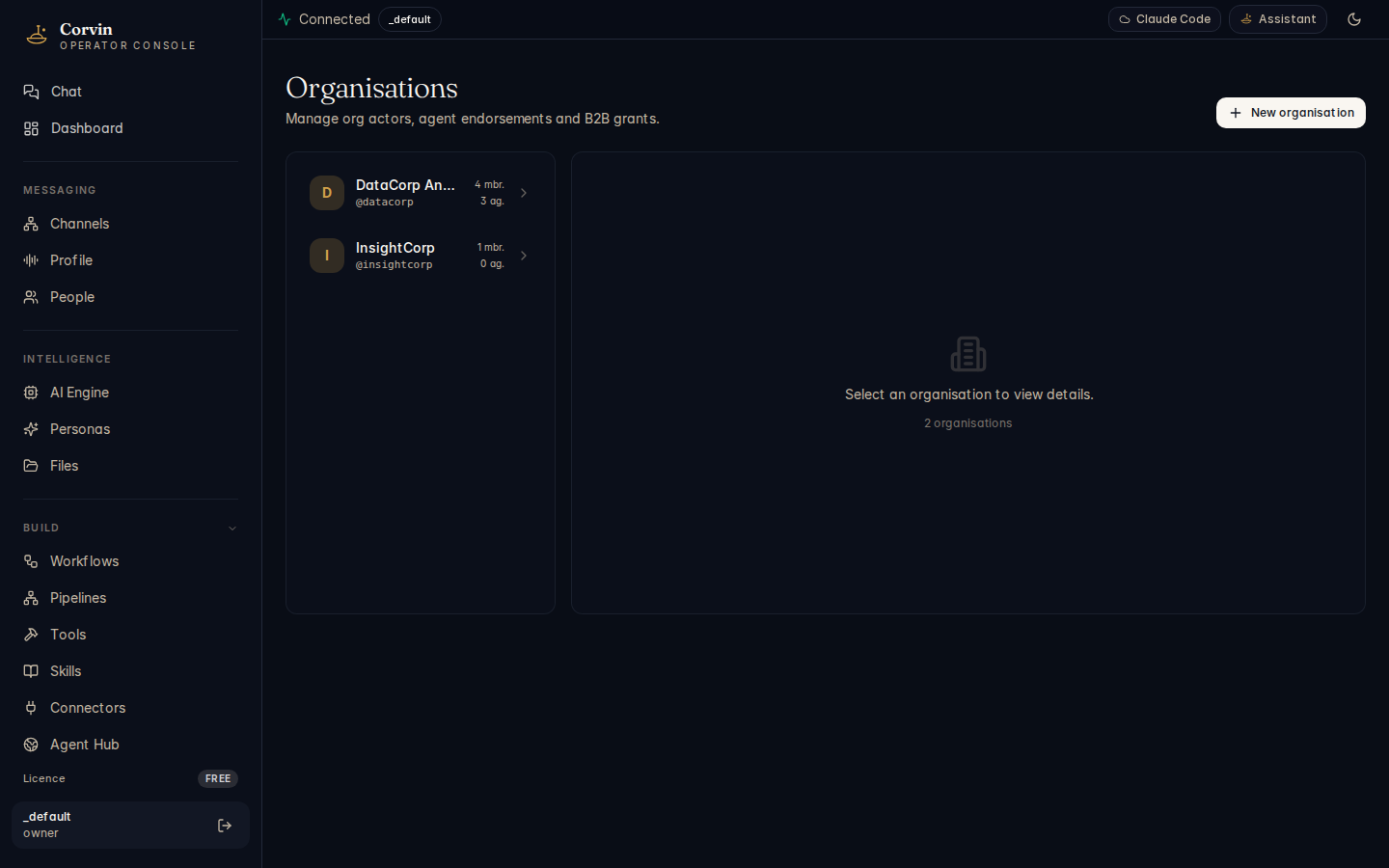
The Organisations page manages multi-tenant CorvinOrg actors — the identity layer that lets multiple operators coordinate across CorvinOS instances for A2A network membership and shared access governance.
Organisation identity
Each organisation has its own actor identity — a DID-like identifier that is stable across key rotations and can be used in A2A network endorsements. The organisation identity is bound to the tenant, not to a specific user, so it persists through membership changes.
Member management
Invite members by email or by sharing a time-limited join link. Assign roles using the same four-tier model as the voice bridge:
- owner — full administrative control, including org deletion and cross-tenant grants
- admin — can invite/remove members and manage grants, but cannot promote to owner
- member — standard access with per-resource quota enforcement
- observer — read-only access; cannot initiate AI turns or submit jobs
Network endorsements
Endorse peer CorvinOS instances to include them in the A2A trust network. An endorsement means that A2A envelopes signed by the peer's instance key will be accepted without requiring a pre-shared HMAC key for each pairing. Endorsements require the org to hold a valid network attestation credential (ADR-0103) — the endorsement UI shows whether the org's credential is current and when it expires.
Grants
Grants give organisation members access to specific resources — compute quotas, Forge workspaces, knowledge providers — without requiring full tenant membership. Grants are time-limited and audited: every grant creation, use, and revocation appears in the compliance audit chain.
Auto-routing
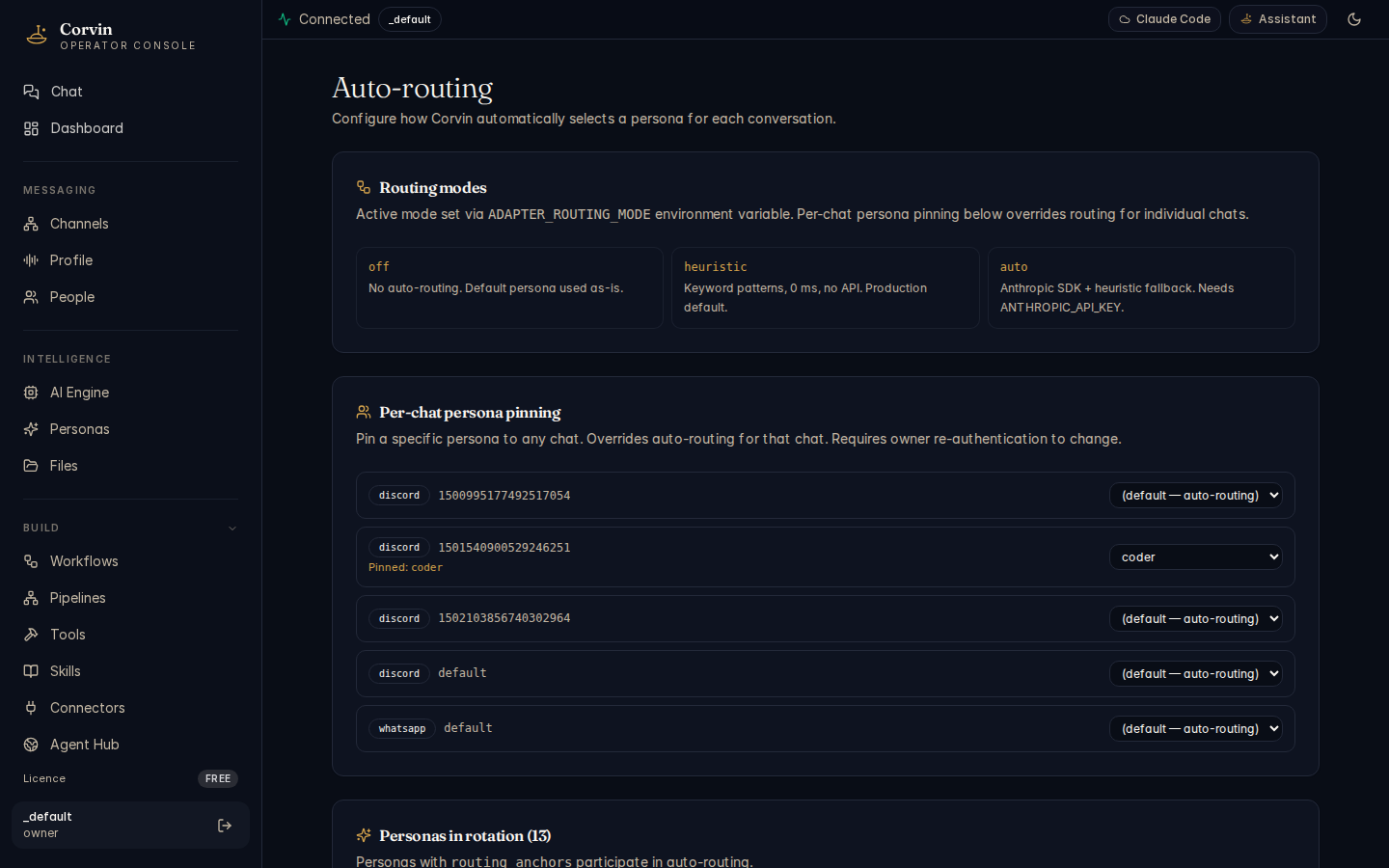
Auto-routing automatically assigns incoming messages to the most appropriate persona based on the message content, channel origin, or keyword patterns — without requiring users to manually select a persona for each conversation.
Routing modes
Choose the routing mode that best fits your latency and cost requirements:
Heuristic (default)
Matches messages against a set of keyword patterns and channel rules. Zero latency, zero API cost — the decision is made entirely in process before the message is dispatched.
Auto (AI classification)
Uses a Claude model call to classify the message intent and select the best persona. Requires ANTHROPIC_API_KEY. More accurate for ambiguous messages; adds a short classification round-trip.
Keyword patterns
In heuristic mode, each rule maps a keyword or regular expression pattern to a target persona. Rules are evaluated in order; the first match wins. Patterns can be scoped to a specific channel or applied globally. Common patterns:
- Messages containing code, bug, error, function →
coderpersona - Messages from a #research channel →
researchpersona - Messages containing browse, search, website →
browserpersona
Fallback persona
When no pattern matches (heuristic mode) or the AI classification confidence is below threshold (auto mode), the message is routed to the fallback persona. The default fallback is assistant. Configure an alternative fallback in the routing settings if your deployment uses a different generalist persona as the default.
Per-chat pinning
A user or operator can pin a specific persona to a chat at any time (e.g. /persona coder). A pinned persona overrides auto-routing for the duration of that chat session. Pinning is cleared when the chat is reset with /new, /clear, or /reset.
Engine Control
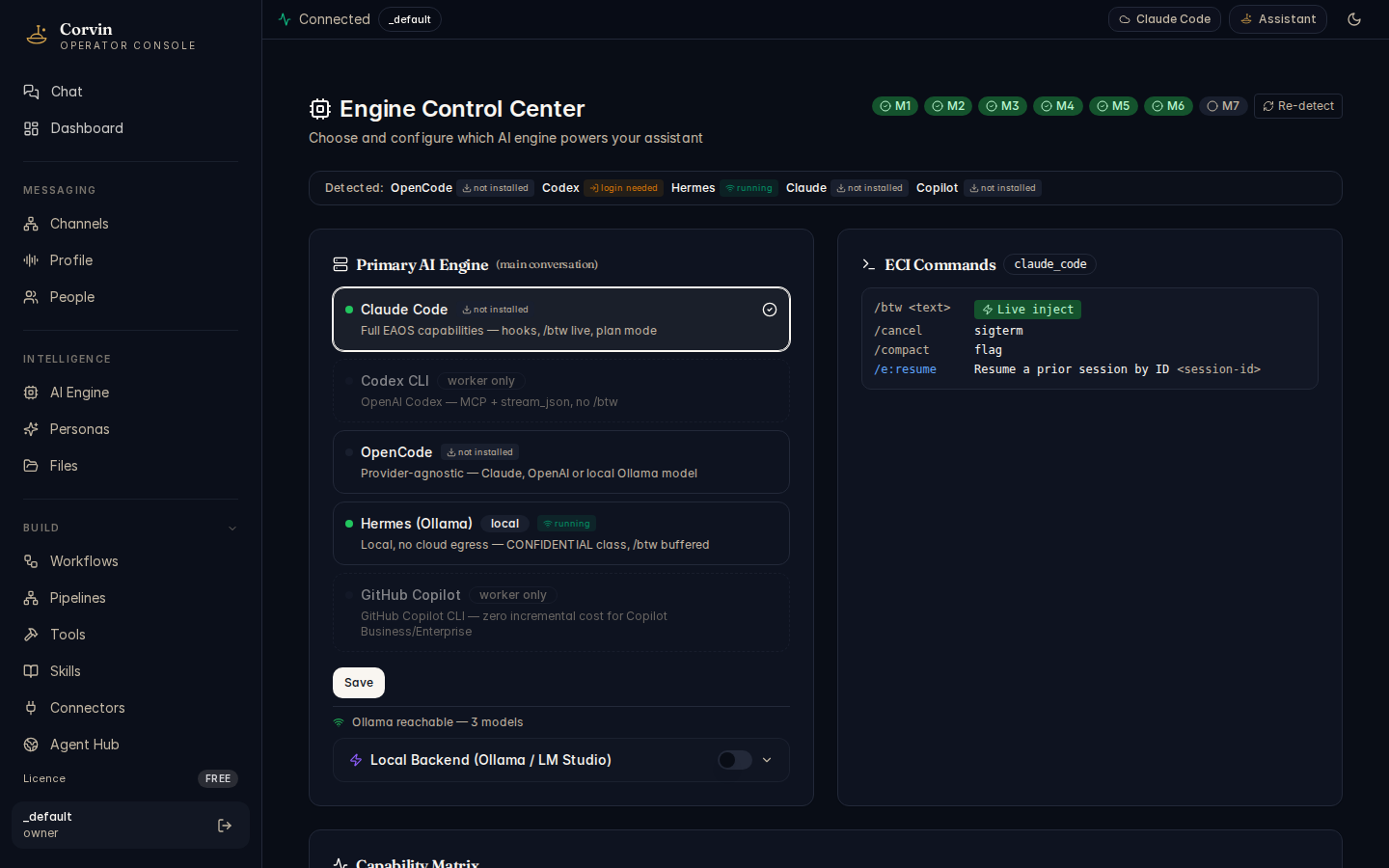
The Engine Control page configures which AI engine handles OS-layer turns, sets per-persona model overrides, and shows the full capability matrix across all five supported engines.
OS Engine panel
The left panel selects the default engine for OS-layer turns. Five engines are available:
- Claude Code — the full-featured default. Supports mid-stream inject (
/btw), hooks, skills, MCP, and all permission modes. Required for orchestrator persona delegation. - Hermes — local Ollama HTTP engine. Zero network egress; qualifies for CONFIDENTIAL-classified data under Layer 34 without a compliance-zone exception. Use when data must not leave the host.
- OpenCode — provider-agnostic engine with MCP and streaming. Lacks mid-stream inject, hooks, and skills; not suitable as the default OS engine for production deployments.
- Codex CLI — MCP and streaming only. Minimal footprint for constrained environments.
- Copilot CLI — wraps GitHub Copilot CLI (
copilot -p). Zero incremental cost for Copilot Business/Enterprise subscribers. Worker-only: lacks/btw, hooks, and skills, so it cannot serve as the OS-turn engine.
Per-persona model overrides (ADR-0123) let you pin a specific model variant to a persona without changing the global engine default. Configure overrides in the table below the engine selector.
Capability matrix
The right panel shows which capabilities each engine supports at a glance:
Mid-stream inject
The /btw side-channel that injects a note into a streaming turn without interrupting it. Supported only by Claude Code.
Hooks
PreToolUse / PostToolUse lifecycle hooks (path-gate, audit, self-test). Required for L10 path-gate enforcement. Claude Code only.
Skills
SkillForge skill injection into the system prompt. Enables LDD layers and per-chat skill learning. Claude Code only.
MCP
Model Context Protocol tool servers (Forge, SkillForge, A2A, artifacts). Supported by Claude Code, OpenCode, Codex, and Hermes via the Tool Execution Broker (TEB).
ECI Commands
Each engine publishes an Engine Command Interface manifest declaring which native commands it supports. These are exposed via the /e:<cmd> syntax in chat. The ECI Commands panel lists all registered commands for the currently selected engine, with their descriptions and usage hints.
Type /engine hermes in any chat to pin that conversation to the Hermes (local Ollama) engine. All subsequent turns in that chat will use the fully-local engine with zero network egress — no cloud API calls are made for OS turns.
Quality (LDD)
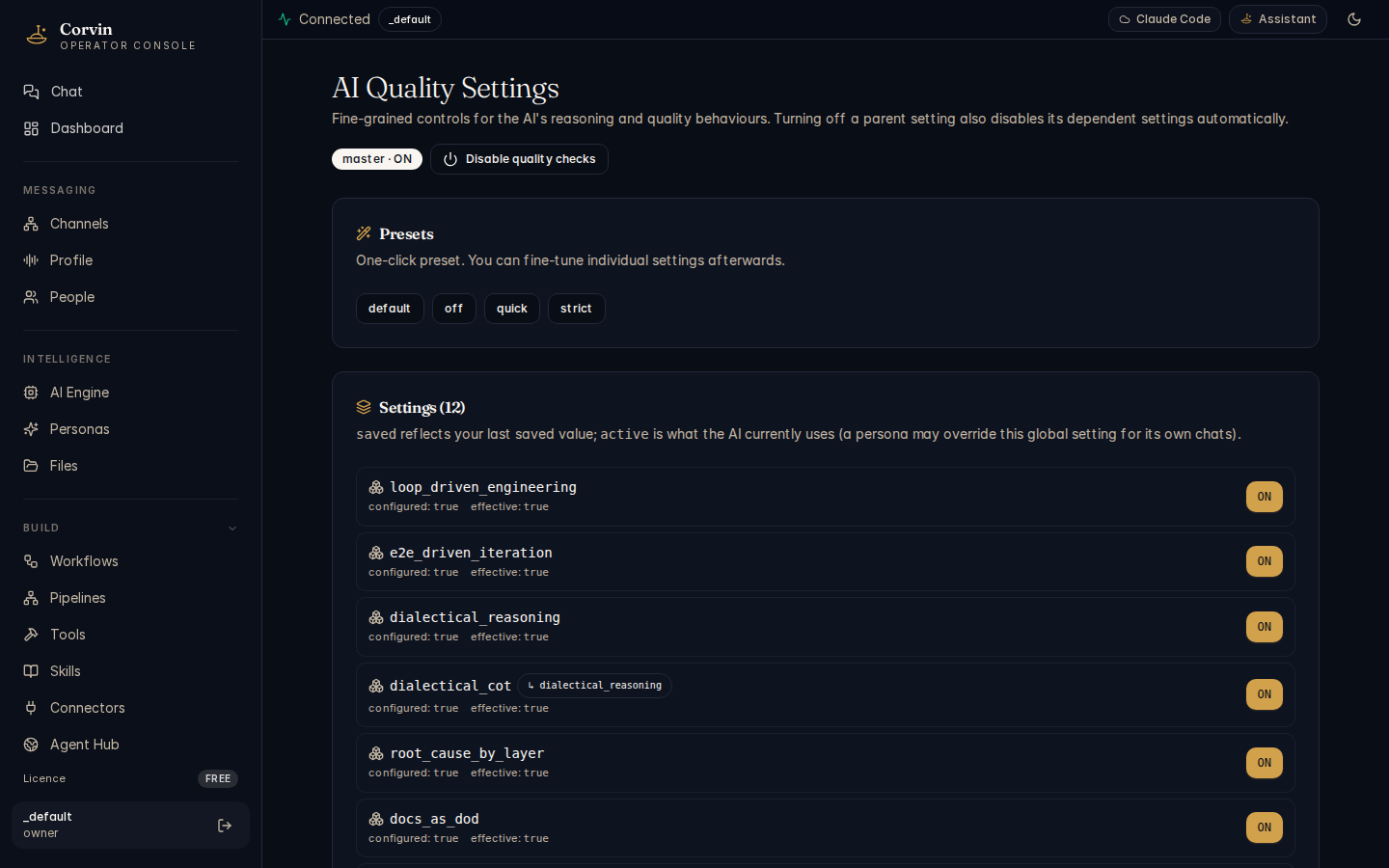
The Quality page configures Loss-Driven Development (LDD) — a structured engineering discipline that enforces consistent quality practices on every AI-assisted task through twelve canonical layer toggles.
What LDD enforces
LDD is a quality framework, not a linter. When active, it injects structured constraints into each AI turn that prevent common shortcuts:
- Symptom patches without naming the structural root cause
- Declaring a task "done" without running the E2E test
- Committing code without syncing the corresponding documentation
- Making a non-trivial architectural decision without a dialectical analysis
- Treating a single observation as a reliable gradient
The 12 layers
Each layer addresses a specific failure mode. Toggle individually or use the master switch to enable all at once:
reproducibility_first— single observation is not a gradient; reproduce before actinge2e_driven_iteration— every fix cycle must start and end with a real E2E rundialectical_reasoning— non-trivial recommendations require a structured for/against analysisroot_cause_by_layer— bugs must name their structural origin before a patch is writtendocs_as_dod— "done" requires doc sync in the same commitper_subtask_e2e— security-touching subtasks each require a real subprocess E2Eloss_backprop_lens— treat quality failures as loss signals, propagate corrections upstreamiterative_refinement— deliverables go through explicit refinement loops before submissionmethod_evolution— after each outer loop, update the working method based on what was learneddrift_detection— detect when the implementation has drifted from the documented designdialectical_cot— complex chains-of-thought must include an adversarial counter-positionloop_driven_engineering— non-trivial tasks must run the three nested LDD loops (inner, refinement, outer)
Presets
Each layer supports four presets: off, on, fast (abbreviated checks, lower overhead), and slow (deep analysis, maximum rigour). The master toggle applies the last-used preset to all layers simultaneously.
LDD configuration lives at .corvin/tenants/_default/global/ldd.json and hot-reloads on every new session — no restart required. Changes made in the console UI take effect immediately for all new conversations.
Settings
The Settings page provides a structured editor for the six canonical tenant configuration files. Changes are applied via hot-reload — the system picks them up immediately without a restart.
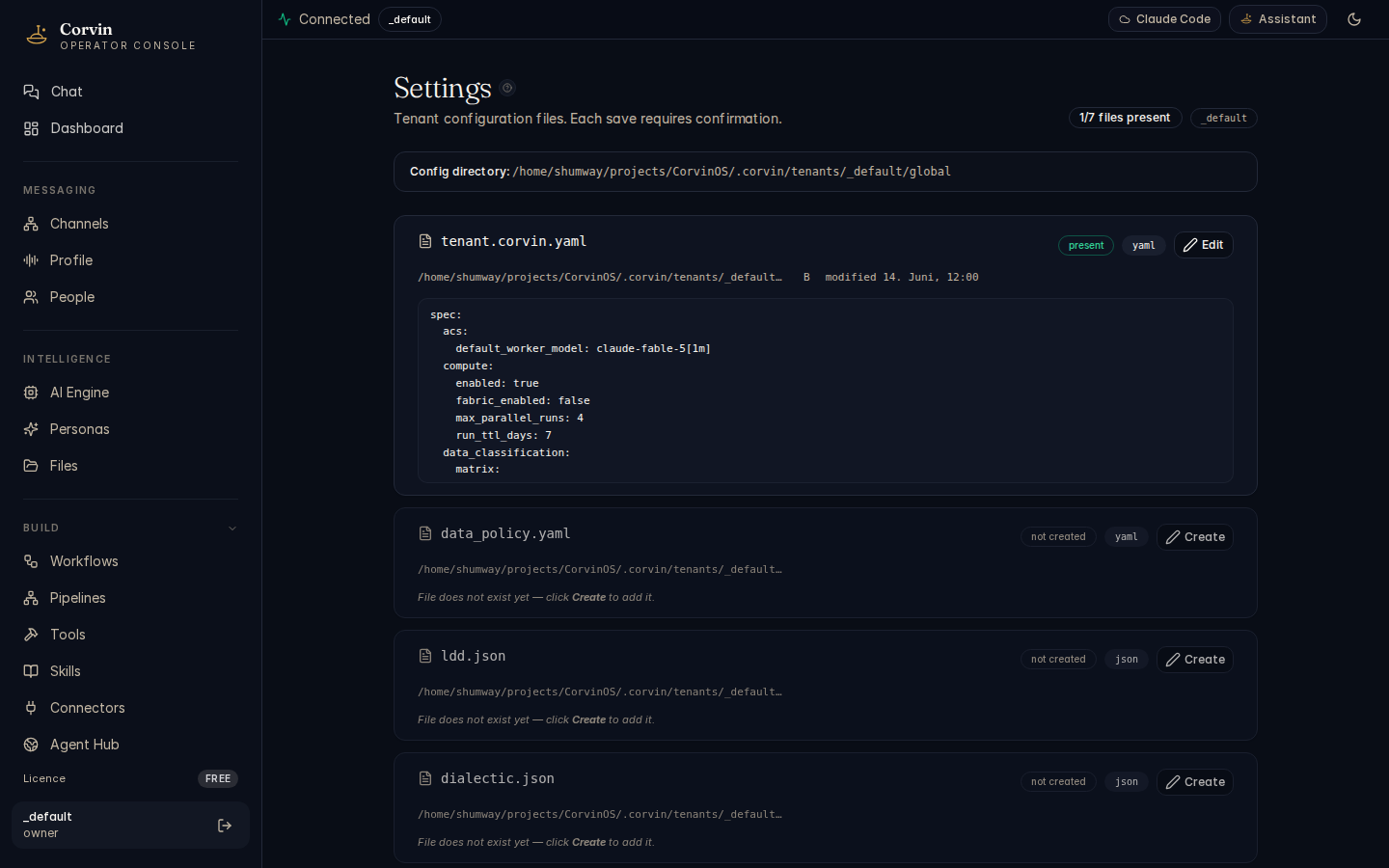
Editable configuration files
- tenant.corvin.yaml — top-level tenant policy: allowed engines, compliance zone, data residency, default engine, compute enable, egress rules, and OIDC settings
- data_policy.yaml — data classification policy: per-engine locality matrix, overrides for the default classification tiers (PUBLIC / INTERNAL / CONFIDENTIAL / SECRET)
- ldd.json — Loss-Driven Development layer toggles and presets (also editable from the Quality page)
- Bridge settings — per-channel adapter settings: whitelist, rate limits, chat profiles, voice summary mode; these settings hot-reload immediately without a bridge restart
- Egress rules — Layer 35 network egress lockdown: allowed hosts, forbidden hosts, and the default action (allow / deny)
- Agentic Compute config — compute worker pool size, strategy defaults, ACS thresholds, and HAC configuration
Live validation
Each editor validates the file against its JSON Schema or YAML schema before saving. Invalid values are highlighted inline with the specific constraint that is violated, so you can correct them before the change is applied.
Hot-reload semantics
Most settings changes are picked up immediately by the running system. The following changes require a bridge restart (via bridge.sh restart) and cannot be hot-reloaded:
- Changes to API tokens or HTTP ports
- Changes to structural daemon code paths or hook registrations
- Changes that modify the
mcp_serverslist in a persona (persona reload applies only to the next new conversation, not in-flight turns)
The audit.jsonl file and policy.json are protected by the path-gate hook and cannot be modified via the console editor. Any attempt is blocked fail-closed and emits a path_gate.denied audit event. This is by design — direct modification of the audit chain or engine policy requires operator-level host access.